Sonar build and performance
Multibeam sonar uses CUDA. Prepare the NVIDIA driver, CUDA compiler/runtime, cuFFT, cuBLAS and Gazebo rendering.
Check the toolchain
On the machine or inside the container that will run sonar:
nvidia-smi
nvcc --version
GPU visibility and compiler availability are separate checks. For containers, configure NVIDIA Container Toolkit on the host as well as the required libraries inside the image.
Select a CUDA architecture
The sonar CMake configuration exposes CUDA_ARCHITECTURE, defaulting to 60. Set it to the SM version supported by your GPU and CUDA toolkit. From a sourced workspace, rebuild after choosing that value:
colcon build --merge-install --executor sequential --symlink-install \
  --cmake-args -DCUDA_ARCHITECTURE=YOUR_GPU_SM
source install/setup.bash
Replace YOUR_GPU_SM with the numeric architecture. Check CUDA's supported architectures before selecting it; a toolkit may have dropped an older target. Do not confuse this project-specific singular variable with CMake's CMAKE_CUDA_ARCHITECTURES.
Verify installed targets
ros2 pkg prefix multibeam_sonar
ros2 pkg prefix multibeam_sonar_system
ros2 pkg prefix posim_multibeam_sonar_demo
Check library files to confirm CUDA targets were built. Packages can register even when CUDA targets are skipped.
test -f "$(ros2 pkg prefix multibeam_sonar)/lib/multibeam_sonar/libmultibeam_sonar.so"
test -f "$(ros2 pkg prefix multibeam_sonar_system)/lib/multibeam_sonar_system/libmultibeam_sonar_system.so"
Each command must exit with status 0. Check build/launch logs for skipped targets or load errors, then receive image/raw data in Multibeam sonar.
Tune one variable at a time
| Setting | Effect to measure |
|---|---|
| Horizontal beams / vertical rays | Angular sampling and computation cost |
Range / maxDistance |
Scene coverage and range processing |
raySkips |
Sampling versus computation |
Sensor update_rate |
Requested sensor throughput |
writeLog, debugFlag |
Disk and console overhead |
| Sensor gain | Image presentation; distinguish it from physical return strength |
Record frame processing time, received topic rate, Gazebo real-time factor, CPU/GPU utilization and memory with the same scene and pose. Separate physics, rendering, CUDA computation, publication and logging costs. Warm up the renderer before timing.
Retain a baseline dataset when changing numerical kernels. Compare intensity/range outputs, not only rendered screenshots. Upstream research and attribution are listed under Citation.
GPU processing flow
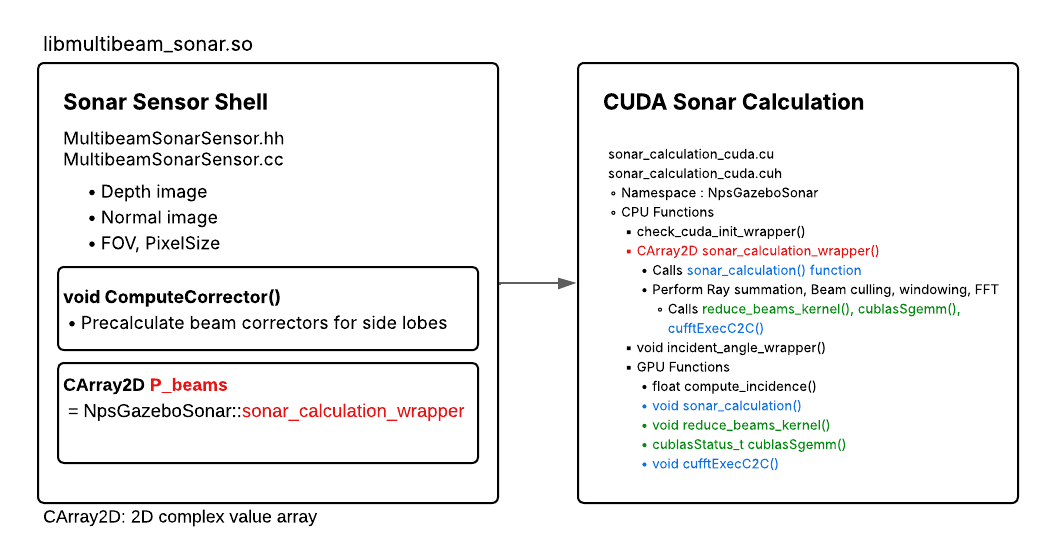
Sonar processing includes ray summation, window/correction and FFT stages. Separate stage timings from GPU memory transfers when profiling. Figure: POSIM Notion Wiki.